
All your customer support in one app, powered by AI
AI live chat, knowledge base and ticketing, all in one app, tightly connected — with AI as the superpower.
14-day trial · 200 AI credits · no credit card
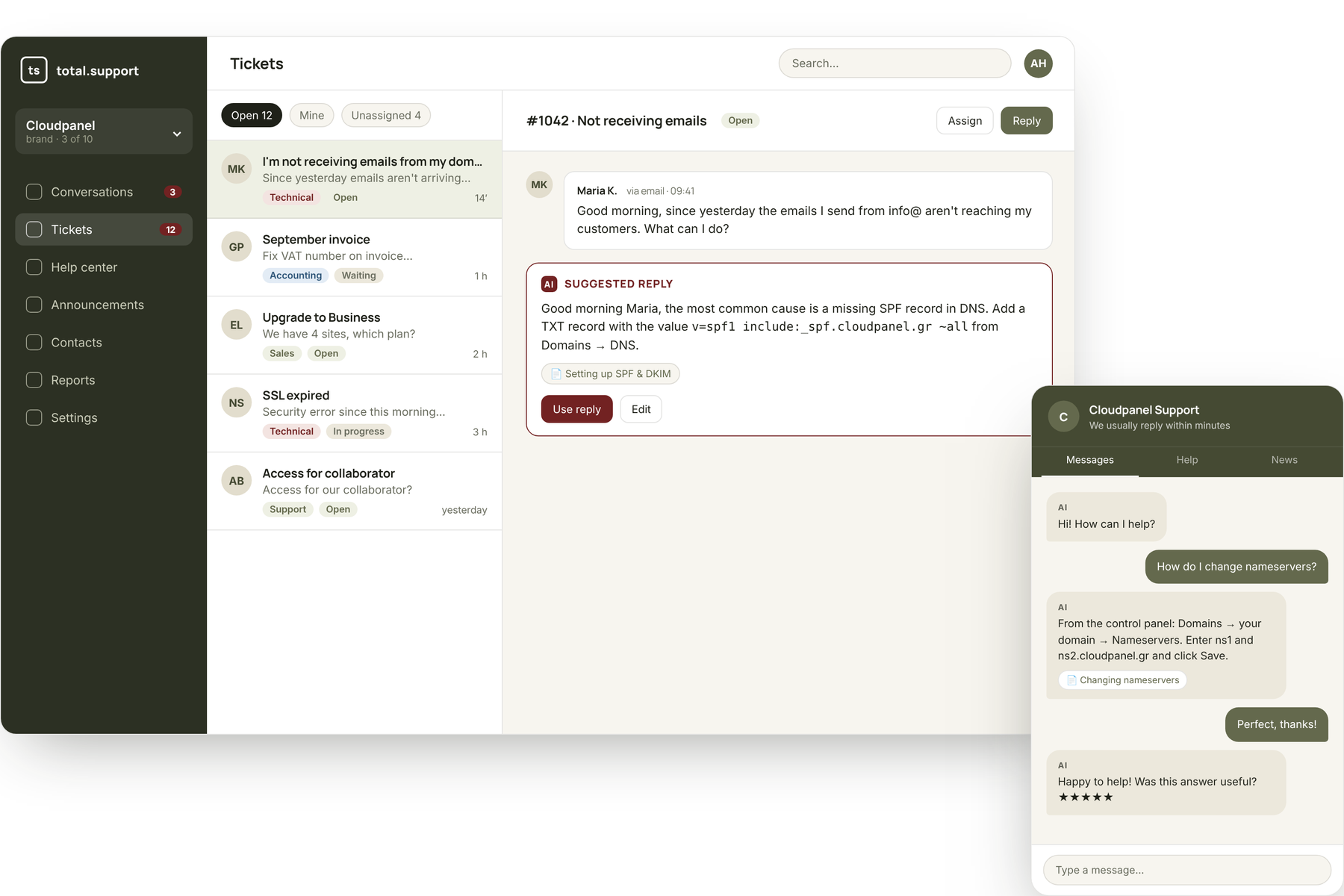
Three tools. One app. One subscription.
Instead of paying for three tools that don't talk to each other, you get one that knows everything about your customers.
Three tools that learn from each other
In most systems chat, help center and tickets are three separate products. Here they form a loop: every answer your team gives makes the AI better for the next one.
The customer asks in the widget
On your site, e-shop or app. No forms, no waiting — they just type as they would to a person.
The AI answers from your own data
Not from the internet. From the articles, guides and instructions you wrote — citing the article so the customer can read it too.
One knowledge base feeds everything
The same content appears in the help center, answers in chat and helps agents with tickets. You write it once.
No answer found? It opens a ticket
The AI doesn't guess. When confidence is low or the customer asks for a person, the conversation goes to your team with the full history.
A human solves it — with AI at their side
The agent sees a suggested reply drawn from the knowledge base, edits it if needed and sends. Even by email.
The solution becomes a new article in one click
The AI turns the ticket into a draft article. Next time someone asks the same thing, it's answered automatically. That's how the system gets smarter every day.
 total.support
AI isn't a button in the corner. It's everywhere.
Everywhere someone writes, reads or searches, your knowledge base and a model that understands it are behind the scenes.
Answers in chat
The bot answers from your articles, with a citation, in the customer's language.
Reply suggestions for tickets
The agent gets a ready draft with citations — reviews it and sends.
Article from a ticket or chat
A solution given once becomes an article for everyone, in one click.
Automatic translation
Every article in as many languages as you like, re-translated whenever you change it.
Smart search
Semantic + keyword search: finds the right article even when the customer describes it differently.
Knowledge gaps
See what customers ask that has no answer — and write it with AI help.
You choose the model per brand: economical for simple questions, premium where quality matters. Every AI answer has a trace: which articles it used and why.
Built for companies with more than one product
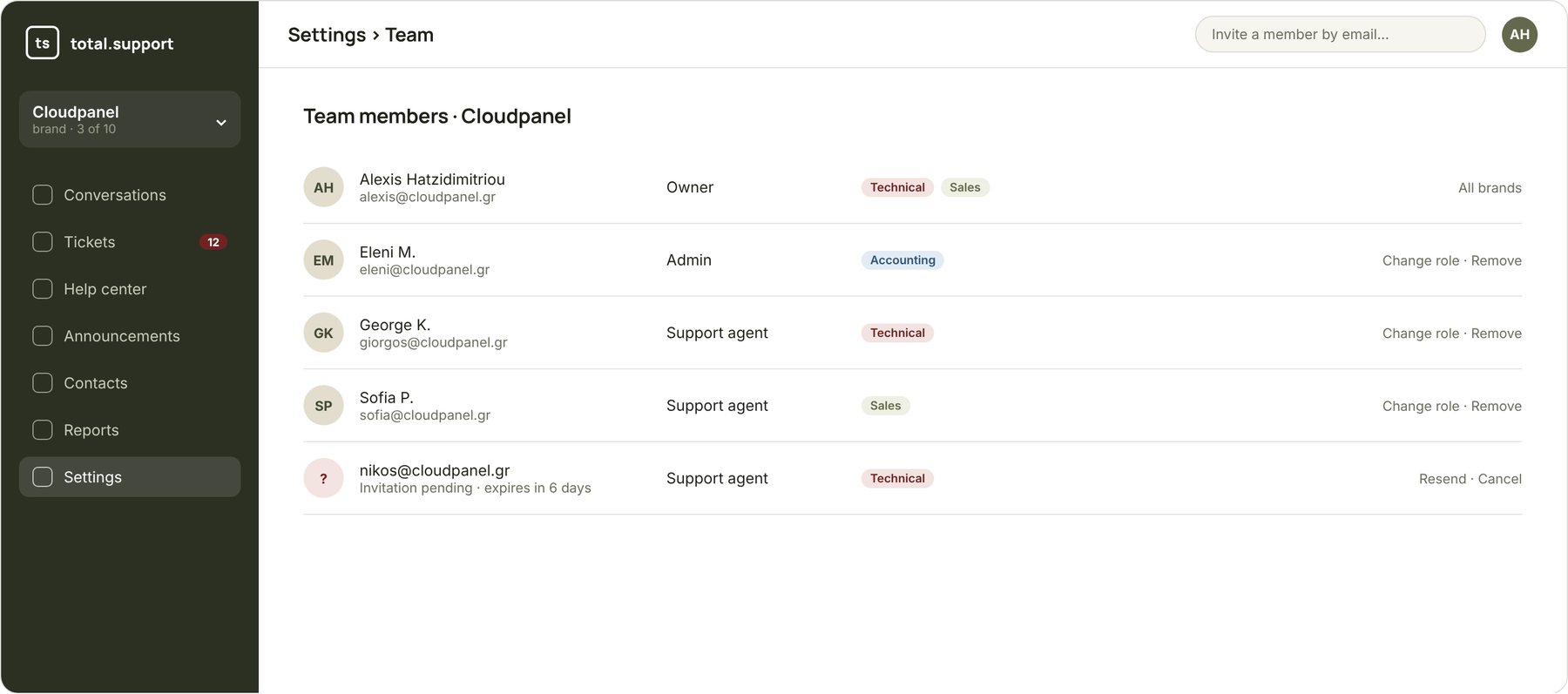
Each brand has its own help center, its own bot, its own support mailbox and its own team. You see everything from one account, on one invoice. And you pay per account — not per agent.
- Separate knowledge base, widget and colours per brand
- Admin and agent roles per brand, invite by email
- Department teams: accounting, sales, technical
- Reports and AI cost per brand
For anyone answering the same questions every day
Different industries, same problem: customers ask, the team can't keep up. See how it works for yours.
Live the same afternoon
Bring your content
Import from files, from your existing site, from Confluence or Zendesk. Or write the first article.
Set up the bot
Name, tone, colours, when to hand over to a human. Test it from the admin before it goes live.
One line of code
Paste the script into your site or e-shop. Connect your support mailbox for tickets.
Watch it work
What's asked, what's solved, what's still unanswered. Fill the gaps with AI help.
Neither a “simple chatbot” nor a heavy helpdesk
Traditional helpdesks charge per agent and have no AI that knows your product. Simple chatbots answer but leave nobody to solve what they don't know.
Traditional helpdesk
Zendesk, Freshdesk, etc.
- ~Tickets and help center, often as separate add-ons
- ✕AI answering from your own content, only on expensive plans
- ✕Per-agent pricing — multiple brands get expensive
- ~Article translation by hand or via add-ons
- ✕Connection to your own AI assistant (MCP)
total.support
One app, one subscription
- ✓Chat, help center and tickets sharing one knowledge base
- ✓AI answers with citations, from day one
- ✓Per-account pricing, multiple brands and agents
- ✓One-click automatic translation into any language
- ✓Built-in MCP server + API
Simple AI chatbot
Chatbase and similar
- ✓Answers from files and pages
- ✕When it doesn't know, the customer is left alone
- ✕No tickets, email or teams
- ✕No public help center
- ✕Knowledge doesn't improve from the team's answers
We built it because we needed it
Our team has supported educational organisations for years through total.school, with many products and thousands of users asking the same things. We tried the big helpdesks: expensive per agent, with AI “on a separate plan” and poor Greek. So we wrote our own — with the knowledge base at the centre and AI working for the team, not instead of it.
Frequently asked questions
Exclusively from your brand's knowledge base: articles, guides, internal notes and whatever you've imported. It doesn't “search the internet”, and every answer shows which articles it used.
It says so and hands the conversation to a person or creates a ticket — you decide when. The agent sees the full conversation history and, if the solution is worth it, turns it into an article in one click.
One line of code before the closing body tag. Works on WordPress, WooCommerce, Shopify, custom apps — anything that serves HTML. Your support mailbox connects via IMAP/SMTP from the settings.
Yes, it's its first language. Search understands Greek with or without accents, and the AI replies in whatever language the customer writes. Articles are translated automatically into every language you enable.
On servers inside the European Union (Frankfurt). The app was designed around GDPR, and you can export or delete your data whenever you want.
The unit for measuring AI usage. One chatbot answer with the base model costs 1 credit, one ticket reply suggestion 1, one article translation 2. Every plan includes monthly credits and you can buy more.
Get started free in 10 minutes
14-day trial with 200 AI credits. No credit card, no installation — just one line of code on your site.